回复 11# 西北有色
你好,我把我的代码贴出来您帮我看看吧:
1.视图按钮下的脚本:
var selectArray =getParameter("_selects");
println("selectArray :::"+selectArray);
var checkSelects = splitText(selectArray,";");
//获取request
var url;
if(checkSelects != null && checkSelects.length > 0){
var url1 = "http://192.168.2.102:880/obpm";
url="/portal/share/report/runqianreport/heihei.jsp?type="+checkSelects[0];
url1=url1+url;
println("URL :"+url1);
}
url1;
2.jsp页面:
<%@ page contentType="text/html; charset=UTF-8" language="java" import="java.sql.*" errorPage="" %>
<%@ taglib uri="runqianReport4" prefix="report" %>
<html xmlns="http://www.w3.org/1999/xhtml">
<head>
<meta http-equiv="Content-Type" content="text/html; charset=utf-8" />
<title>testJsp</title>
</head>
<body leftmargin="0" topmargin="0" rightmargin="0" bottommargin="0">
<%
String params="type="+request.getParameter("type"); //获取链接中的参数值
out.println(params+" ======ttt==");
%>
<report:html name="sql" params="<%=params%>" needSaveAsExcel = "yes" needPrint = "yes" srcType="file" reportFileName="局.raq" saveAsName="sql" />
</body>
</html>
3.润乾配置文件:
<jdbc-ds-configs>
<jdbc-ds-config>
<name>North</name>
<db-type>ds1</db-type>
<connection-url>jdbc:jtds:sqlserver://192.168.2.101:1433/NWME_OA</connection-url>
<driver-class>net.sourceforge.jtds.jdbc.Driver</driver-class>
<user-name>sa</user-name>
<password>x=85521626</password>
<db-charset>GBK</db-charset>
<client-charset>GBK</client-charset>
<extend-properties></extend-properties>
</jdbc-ds-config>
</jdbc-ds-configs>
就这些了,我刚刚用按钮是跳转 换了一个空白的jsp页面来调试,下内容就是hello,heihei heihei 在前台显示
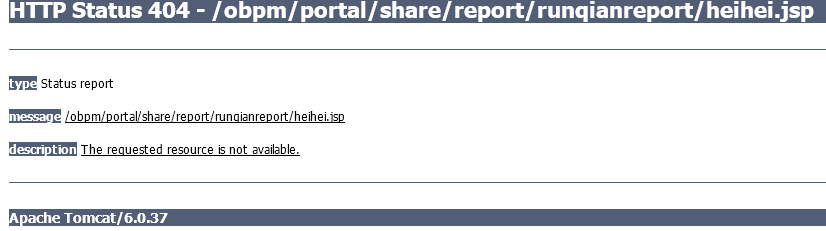
这个错误提示我那个jsp 页面找不到路径,可是我的路径是对的。就在这下面放着呢。
您可以在本地测试下。 |
 楼主: 西北有色


 不行的
不行的