一、原来的按钮
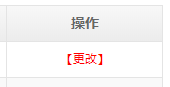
iscript值脚本代码:
#include "SystemFunction"
var curdoc = getCurrentDocument()
var rtn = ""
if(getNewStateLabel(curdoc).equals("结束")){
rtn = "<a href=\"javaScript:viewDoc('"+curdoc.getId()+"', '11eb-3503-36e36bb3-a5b6-f58b71da', 'false','11eb-35fa-c10e7bc3-864d-9fa5f')\" style=\"color:red\">【更改】</a>"
}
rtn
二、优化后的按钮
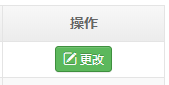
iscript值脚本代码:
#include "SystemFunction"
var curdoc = getCurrentDocument()
var rtn = ""
if(getNewStateLabel(curdoc).equals("结束")){
rtn = "<a name='button_act2' class='btn normalBtn radius green' title='修改客户信息' href=\"javaScript:viewDoc('"+curdoc.getId()+"', '11eb-3503-36e36bb3-a5b6-f58b71da', 'false','11eb-35fa-c10e7bc3-864d-9fa5f')\" ><i class='icon iconfont icon-edit'></i><span>更改</span></a>"
}
rtn |



 IP卡
IP卡 狗仔卡
狗仔卡
 提升卡
提升卡 置顶卡
置顶卡 沉默卡
沉默卡 喧嚣卡
喧嚣卡 变色卡
变色卡 显身卡
显身卡