本帖最后由 purple 于 2012-10-16 17:24 编辑
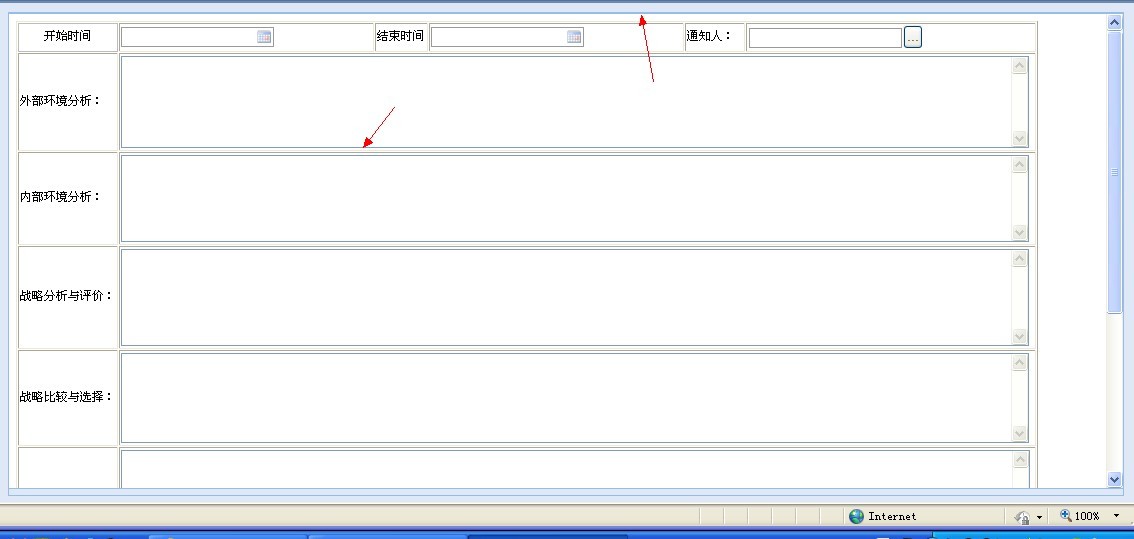
我想把上图2个边框的颜色改成其他颜色,不知如何改?
附已有样式:
/* CSS Document */
/* default cstyle */
/* body {margin-left: 0px; margin-top: 0px; margin-right: 0px;} */
html,body,div,form,ul,ol,li,dl,dt,dd,p {
margin: 0;
padding: 0;
}
/*平台字体*/
body,tbody {
font-size: 12px;
}
/*表头“保存”“返回”*/
.table_noborder {
border-collapse: collapse;
border-spacing: 0;
width: 100%;
}
/*公用字体*/
.commFont {
font-family: Arial, Helvetica, sans-serif;
font-size: 12px;
width: auto;
}
/* Form Tab style start 表式样修改从这里开始*/
/*基本表*/
.basictab {
background-color: #ebeef4;
border-bottom: 1px solid #adbcd4;
height: 26px;
}
/*基本表——无序列表*/
.basictab ul {
background-image: url(../imgv2/front/main/tab_container_back.gif);
background-position: top;
background-repeat: repeat-x;
font: bold 12px Verdana;
height: 23px;
list-style-type: none;
margin-bottom: 0;
margin-left: 0;
text-align: left;
/*set to left, center, or right to align the menu as desired*/
}
/*基本表——无序列表项目*/
.basictab li {
float: left;
margin: 0 5px;
}
/*基本表——无序列表项目链接*/
.basictab li a {
color: #416aa3;
font-weight: 400;
height: 23px;
line-height: 23px;
margin-right: 3px;
padding-left: 5px;
padding-right: 5px;
text-decoration: none;
vertical-align: middle;
}
/*基本表——无序列表项目链接访问过样式*/
.basictab li a:visited {
color: #416aa3;
}
/*基本表——无序列表项目链接鼠标放到链接接上样式*/
.basictab li a:hover {
color: 0;
}
/*属性页*/
.tabcontainer {
clear: left;
height: 100%; /*width of 2nd level sub menus*/
width: 100%;
border-color: #FF0000;
/*height of 2nd level sub menus. Set to largest's sub menu's height to avoid jittering.*/
}
/*按钮链接*/
.button-cmd a {
background: url(../imgv2/front/main/btn_back2.gif) left 0 repeat-x;
color: #000;
cursor: pointer;
display: inline;
float: left;
height: 23px;
text-decoration: none;
}
/*按钮链接鼠标放到链接上样式*/
.button-cmd a:hover {
background: url(../imgv2/front/main/btn_back.gif) left 0;
background-repeat: repeat-x;
color: #000;
cursor: pointer;
display: inline;
float: left;
height: 23px;
text-decoration: none;
}
/*按钮链接行内元素样式*/
.button-cmd a span {
background: url(../imgv2/front/main/btn_back2.gif) right 0;
background-repeat: repeat-x;
cursor: pointer;
display: inline;
float: left;
height: 23px;
margin: 0 0 0 10px;
padding: 3px 10px 3px 0;
}
/*按钮链接行内元素鼠标放到链接上样式*/
.button-cmd a:hover span {
background: url(../imgv2/front/main/btn_back.gif) right 0;
background-repeat: repeat-x;
cursor: pointer;
display: inline;
float: left;
height: 23px;
margin: 0 0 0 10px;
padding: 3px 10px 3px 0;
}
/*按钮链接文档样式*"保存、返回未选择时颜色"*/
.button-document a {
color: #000;
cursor: pointer;
float: left;
height: 22px;
text-decoration: none;
}
/*按钮链接文档样式*/
.button-document a span {
float: left;
height: 16px;
margin: 0 0 0 10px;
padding: 3px 10px 3px 0;
}
/*按钮链接文档鼠标放到链接上样式*"保存、返回选择时颜色"*/
.button-document a:hover {
background: url(../imgv2/front/main/btn_back.gif) left 0;
background-repeat: repeat-x;
color: #FFF;
cursor: pointer;
height: 22px;
}
/*按钮链接文档鼠标放到链接上行内样式*/
.button-document a:hover span {
background: url(../imgv2/front/main/btn_back.gif) right 0;
background-repeat: repeat-x;
height: 16px;
margin: 0 0 0 10px;
padding: 3px 10px 3px 0;
}
/*分页显示样式*/
.page-nav {
background-image: url(../imgv2/front/main/nav_bg.gif);
background-repeat: repeat-x;
height: 27px;
margin-top: 0;
width: 100%;
}
/*分页显示样式2*/
.page-nav2 {
background-image: url(../imgv2/front/main/act_back2.gif);
background-repeat: repeat-x;
height: 27px;
margin-top: 0;
width: 100%;
}
/*表格主框体背景色*/
.body-front {
background-color: #f3f3f3;
margin-left: 0;
margin-top: 0;
} |
 |手机版|天翎MyApps技术社区
( 粤ICP备11093750号 )
|手机版|天翎MyApps技术社区
( 粤ICP备11093750号 )



 IP卡
IP卡 狗仔卡
狗仔卡
 提升卡
提升卡 置顶卡
置顶卡 沉默卡
沉默卡 喧嚣卡
喧嚣卡 变色卡
变色卡 显身卡
显身卡 ,不好意思,没太看出来您是要改乃个部门,能否圈出来呀?
 楼主
楼主