天翎MyApps技术社区 - 低代码平台 | 流程管理系统 | BPM软件

 找回密码
 注册成为天翎用户
查看: 1183|回复: 0

[常见问题] 视图添加标题

[复制链接]
Chain 发表于 2018-9-10 15:20:19 | 显示全部楼层 |阅读模式
视图在使用的过程中想添加标题,目前实现的方式有两种,一种是直接按F12,抓取视图页面所在的JSP文件,直接修改文件即可。这种情况是所有的视图都会有影响,所以不推荐使用;另一种则是直接通过脚本来添加Html来实现。

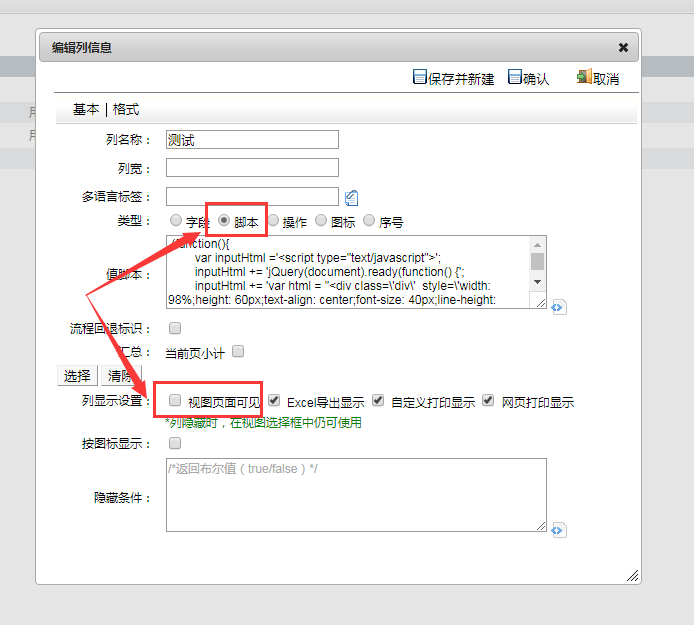
第一步:添加一个视图列,切换成脚本模式,并设置在视图中隐藏;

QQ截图20180910130943.png

第二步:添加脚本;
  1. (function(){
  2.         var inputHtml ='<script type="text/javascript">';
  3.         inputHtml += 'jQuery(document).ready(function() {';
  4.         inputHtml += 'var html = "<div class=\'div\'  style=\'width: 98%;height: 60px;text-align: center;font-size: 40px;line-height: 50px;border: 1px solid black;margin: 1%;\'>这是一个标题</div>";'
  5.         inputHtml +='jQuery(".btn-primary").before(html);';
  6.         inputHtml += 'var ids = [];';
  7.         inputHtml += '$(".div").each(function() {';
  8.         inputHtml += 'var kc = $(this).children("div:eq(1)").text();';
  9.         inputHtml += 'if(ids.indexOf(kc) < 0) {';
  10.         inputHtml += 'ids.push(kc);';
  11.         inputHtml += '} else {';
  12.         inputHtml += '$(this).hide();';
  13.         inputHtml += '}';
  14.         inputHtml += '})';
  15.         inputHtml += '})';
  16.     inputHtml += '</script>';
  17.         return inputHtml;
  18. })();
复制代码
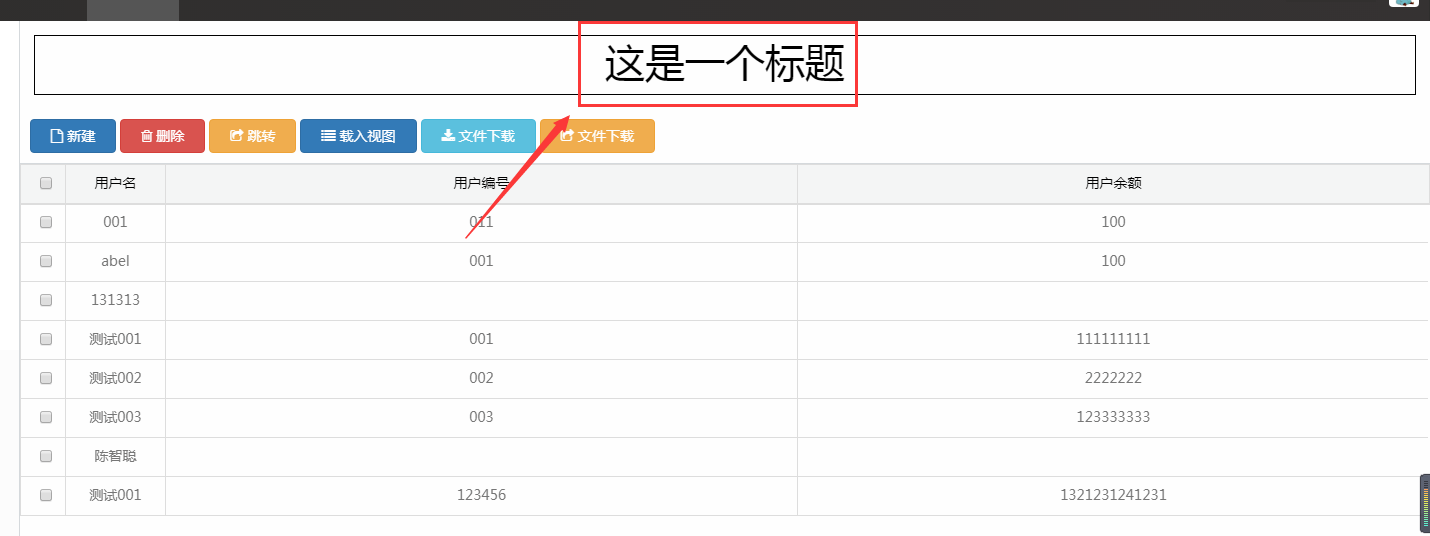
效果:

QQ截图20180910130822.png

本版积分规则

QQ|手机版|天翎MyApps技术社区 ( 粤ICP备11093750号 )

GMT+8, 2026-8-12 12:24

Powered by Discuz! X3.4

Copyright © 2001-2020, Tencent Cloud.

快速回复 返回顶部 返回列表